

Tips for Creating Your Timetable
Before you start creating your timetable, there are two points you should consider in advance:
- Familiarize yourself with the university's vocabulary: What are modules? What do s.t. and c.t. mean? What do the units LP, ECTS and SWS stand for? We explain these terms and many more in our Glossary (in German).
- For some degree programmes, you will already find pre-prepared timetables or so-called sample timetables or model timetables on the respective programme websites. The student representatives (Fachschaft) may also sometimes help with timetable planning. In other cases, you will receive pre-prepared or sample timetables for guidance during the introductory event listed in our events programme. Nevertheless, you should definitely familiarize yourself with timetable planning independently before starting your studies.
How to Create Your Timetable
Determine the Modules and Courses Offered in a Semester
- 1) Important documents for your studies: Module Handbook and Examination RegulationsHide
-
You should always have two important documents at hand when creating your timetable. These are the Examination Regulations and the Module Handbook for your degree programme. They generally indicate when a course is offered, for example only in the winter semester, only in the summer semester or in both semesters, which semester is recommended for taking the course, for example the 1st or 2nd semester, and whether there are any prerequisites for participation.
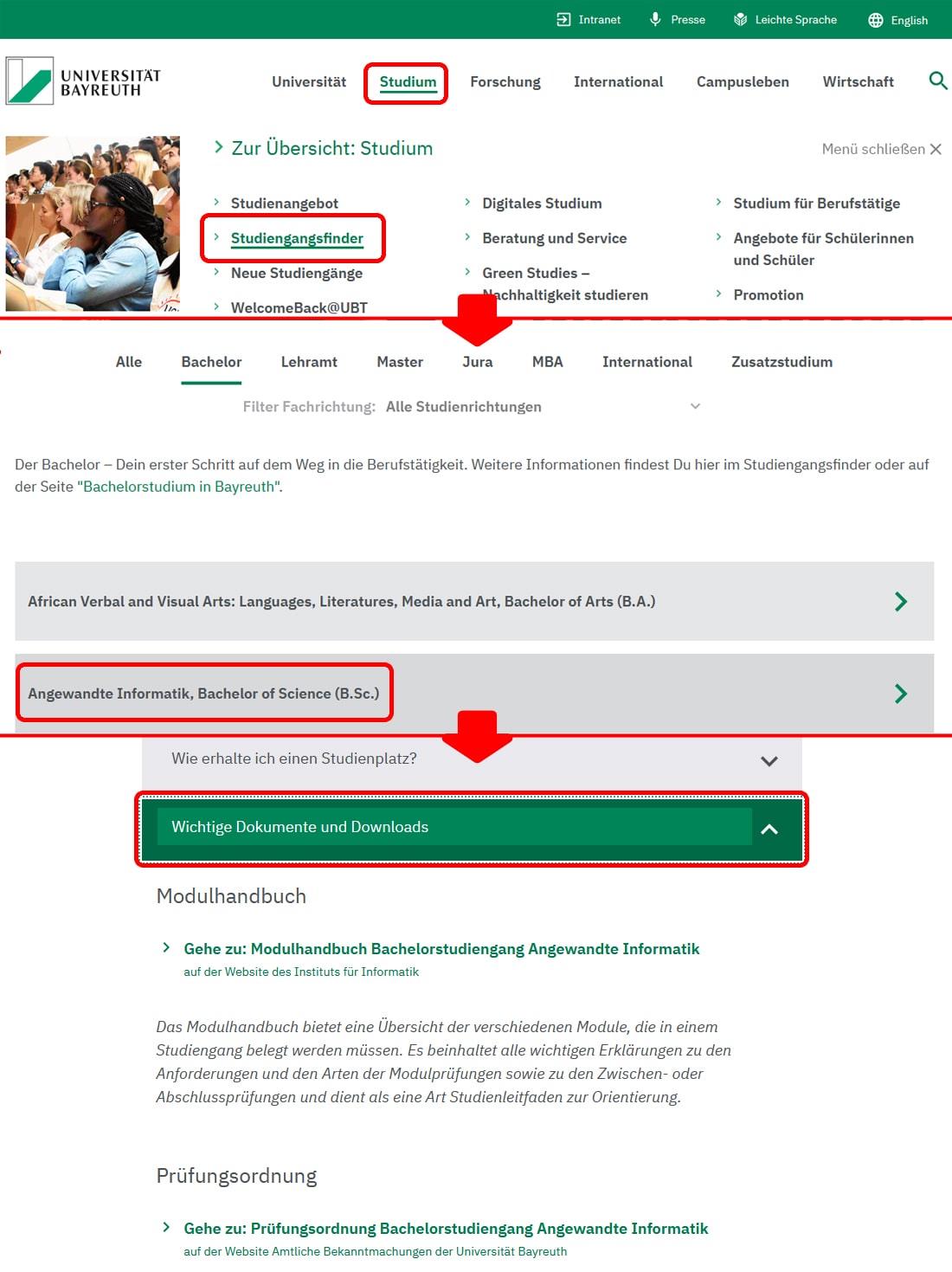
Always make sure that these documents are up to date and valid. You can often find both documents on your degree programme's website, for example under sections such as "Dokumente" (Documents) or "Downloads". They can also be found on the overview page for your degree programme, which you can access via the Study Programme Finder. Both documents are linked under "Wichtige Dokumente und Downloads" (Important Documents and Downloads) or "Wichtige Dokumente" (Important Documents) on the overview pages for teacher training subjects.
- 2) Guidance toolsHide
-
The Module Handbook often contains study progression plans organised by semester and sometimes even sample timetables. This gives you an overview of which modules and courses you need to take in a particular semester.
If you cannot use any pre-prepared plans for guidance or if you have a great deal of freedom in designing your timetable, the rule of thumb is: 4 to 5 lectures or 14 to 20 semester hours of in-person courses (SWS; 1 semester hour equals 45 minutes), in your first semester.
You will also need time to prepare presentations, complete exercises and study for exams. On average, the planned course of study comprises 30 ECTS credits per semester.
Find Course Times Using cmlife
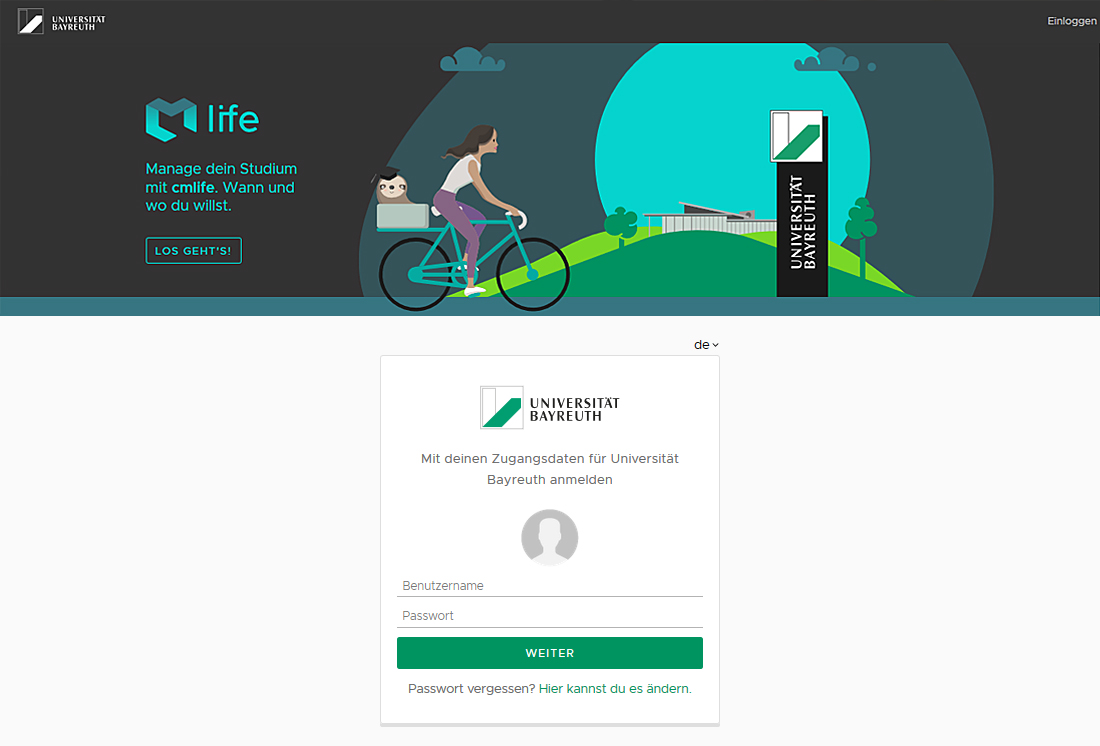
- 1) Log in to cmlife (my.uni-bayreuth.de) using your user ID and passwordHide
-
You can access the cmlife user interface here.
Here you'll find instructions for cmlife.
- 2) Go to "Studium" (Studies) in the top menu barHide
-
- 3) Select the desired degree programme and switch to the planning viewHide
-
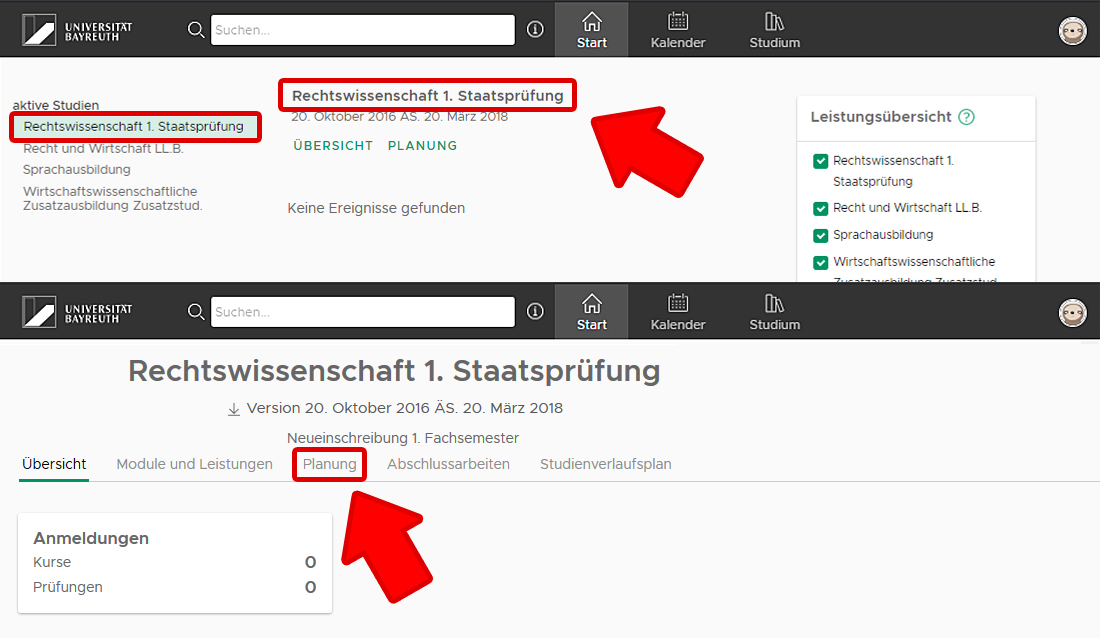
Under "aktive Studien" (Active Studies), you can select your degree programme. Clicking on the name of the degree programme in the middle column opens a new overview page. Select the "Planung" (Planning) tab.
- 4) Sections of your degree programme are displayed as tilesHide
-
You can find out which section the individual modules belong to by consulting the Module Handbook or the Examination Regulations. In some cases, the examination regulations are also linked directly in cmlife.
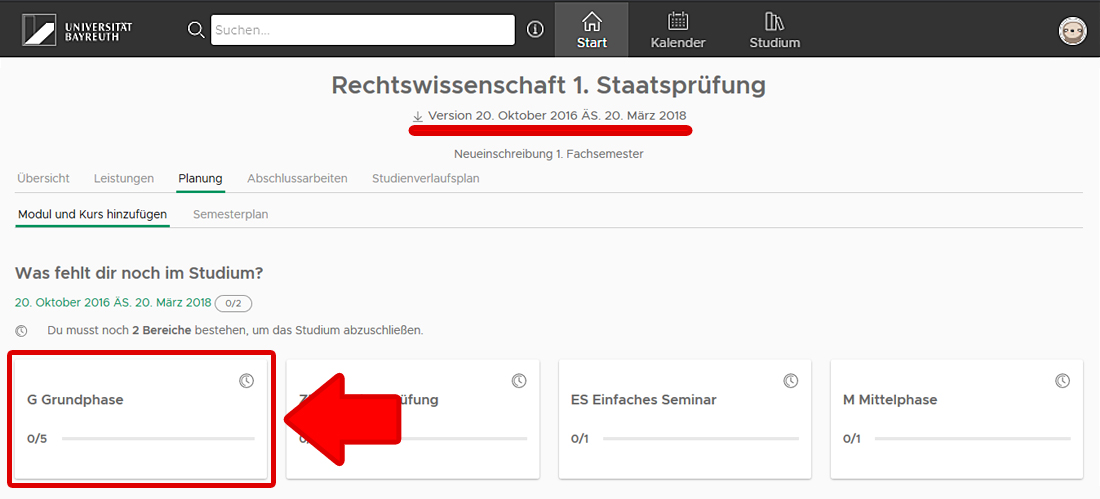
- 5) Navigate through the structure of your degree programme to the desired moduleHide
-
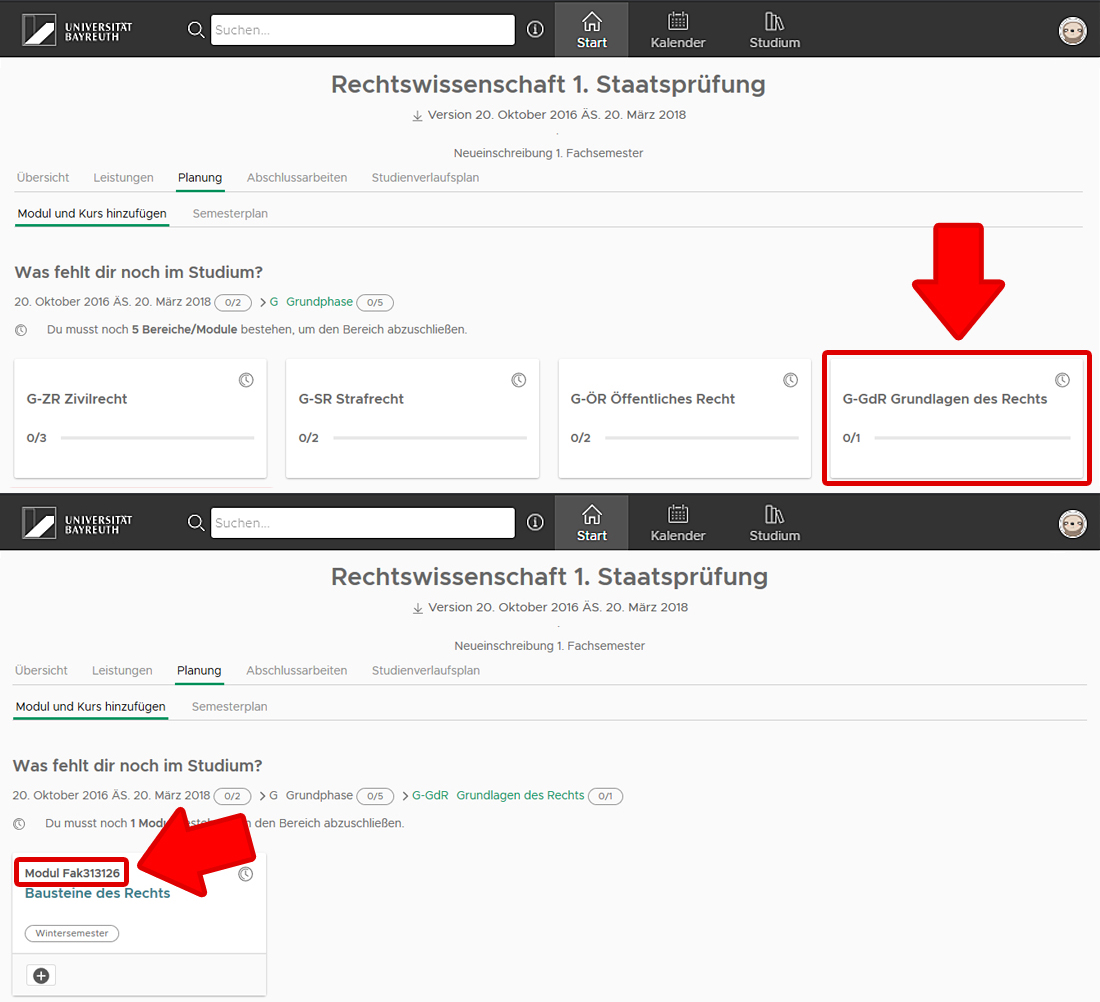
- 6a) After selecting a module, you will find the corresponding courses under "Kurse" (Courses)Hide
-
Pay attention to the semester indicated here. The winter semester always begins on 1 October, while the summer semester always begins on 1 April.
If you want to view courses for the upcoming semester before the semester officially begins, you will need to use the arrows to switch to the next semester. Please note that course times are generally only finalised relatively shortly before the beginning of the semester.
Sometimes several courses are offered as alternatives under one module, allowing you to choose a suitable time or a topic that interests you most. However, some modules consist of several courses, all of which you are required to attend. Be sure to check the Module Handbook carefully in this regard!
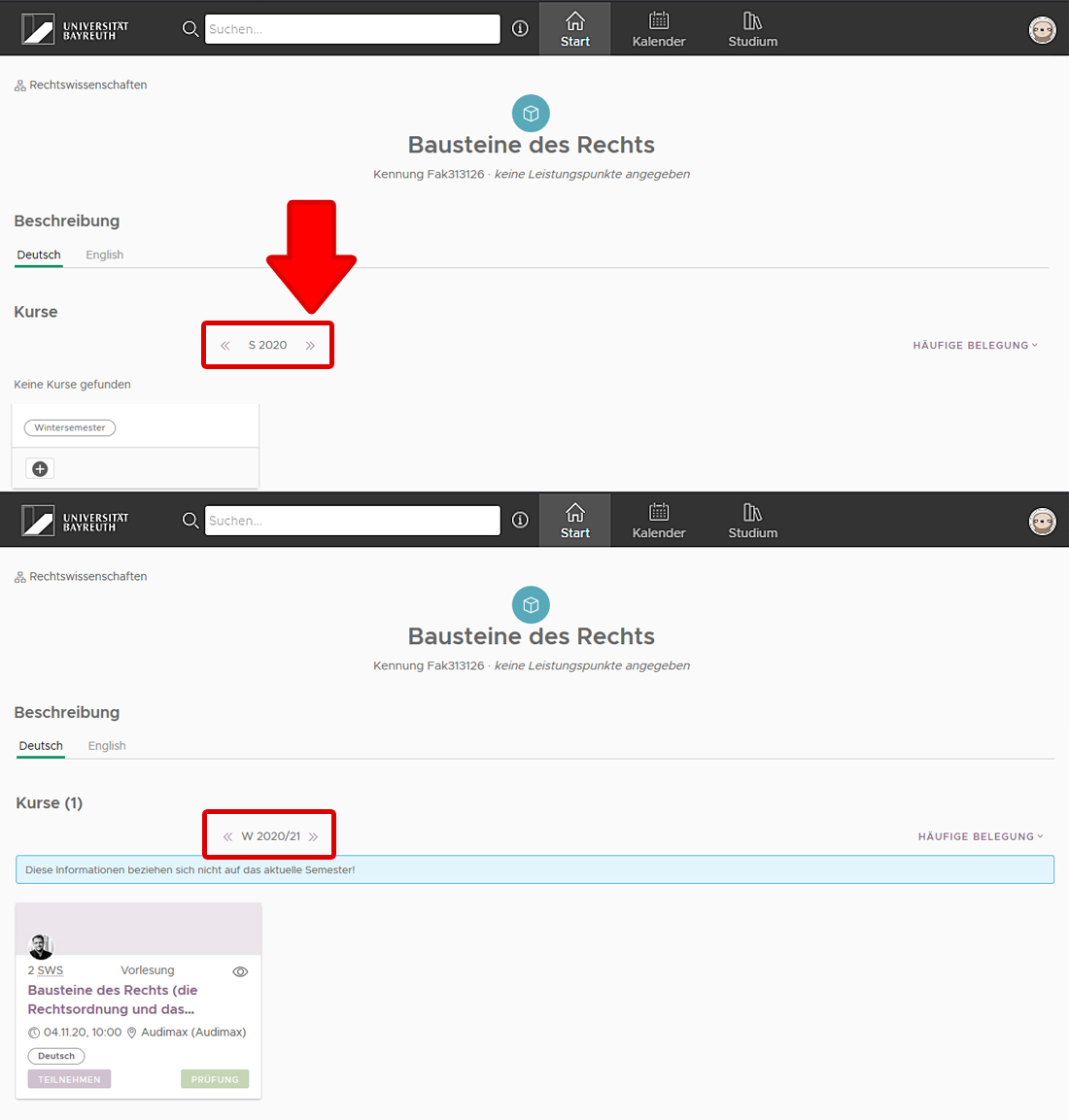
- 6b) If no courses are listed, you must use the search function in cmlifeHide
-
The search field is located in the black menu bar at the top. Clicking on the information button next to it provides further information on how to conduct a search. The search results offer several categories to choose from.
Here too, make sure that the correct semester is selected when displaying courses and adjust the time period if necessary.
Please note that some courses always have the same name. However, some courses, particularly seminars, change their topics and therefore their titles. Always pay attention to the exact module assignment and the course name. If you are unsure, contact a person responsible for your degree programme.
If you only want to search for part of a course or module name, you must use the percentage sign "%" as a wildcard before and/or after the respective search term.
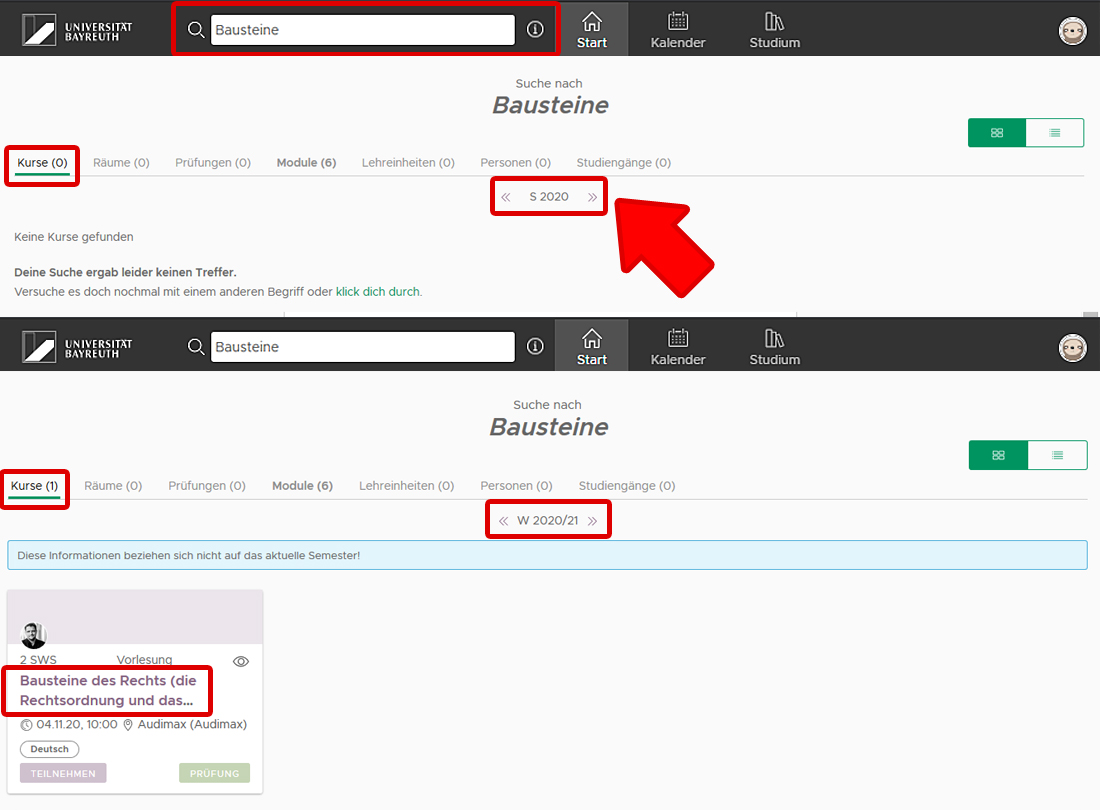
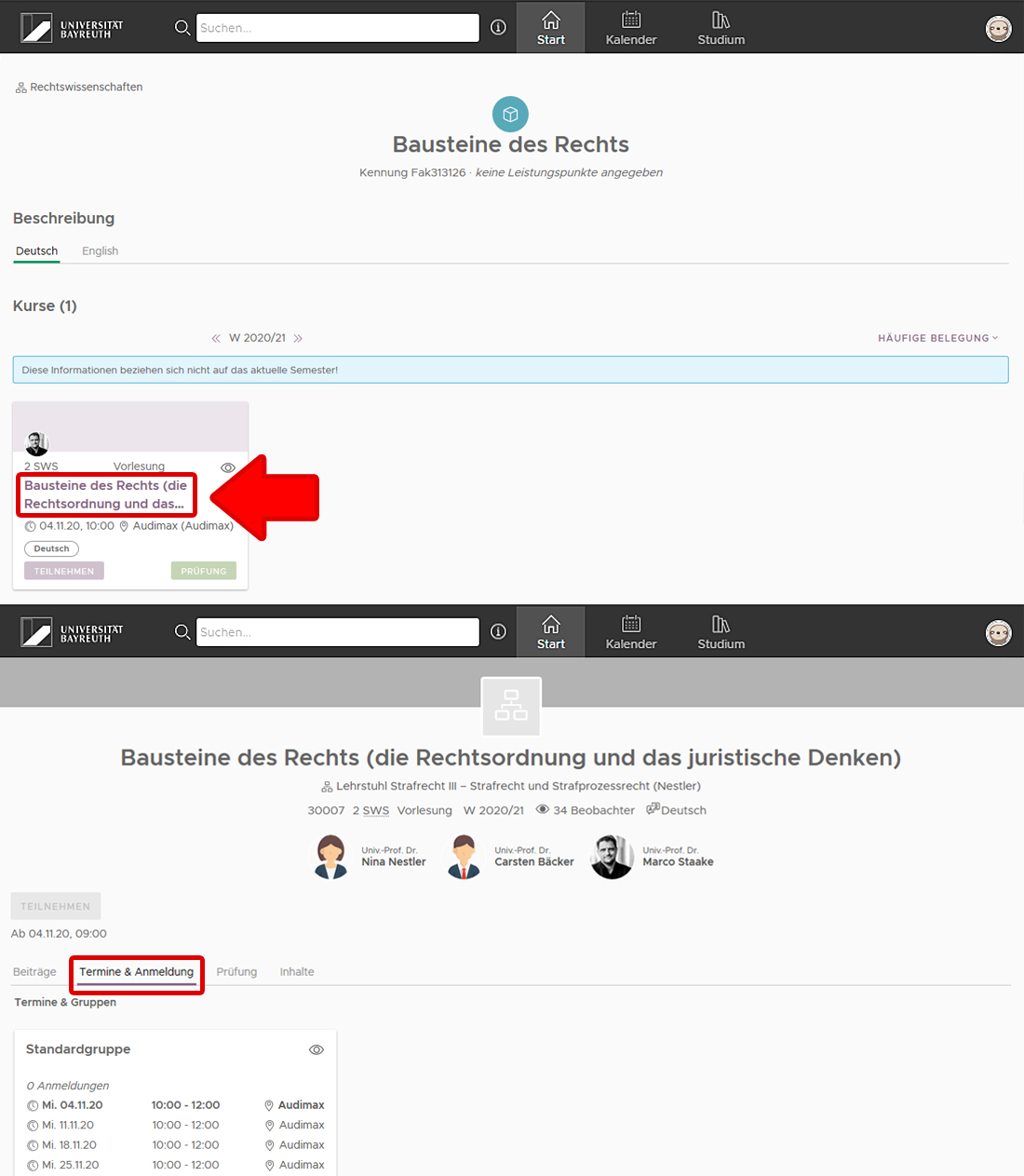
- 7) Click on the course name to access further informationHide
-
Under "Termine und Anmeldung" (Dates and Registration), you will find the scheduled course times.
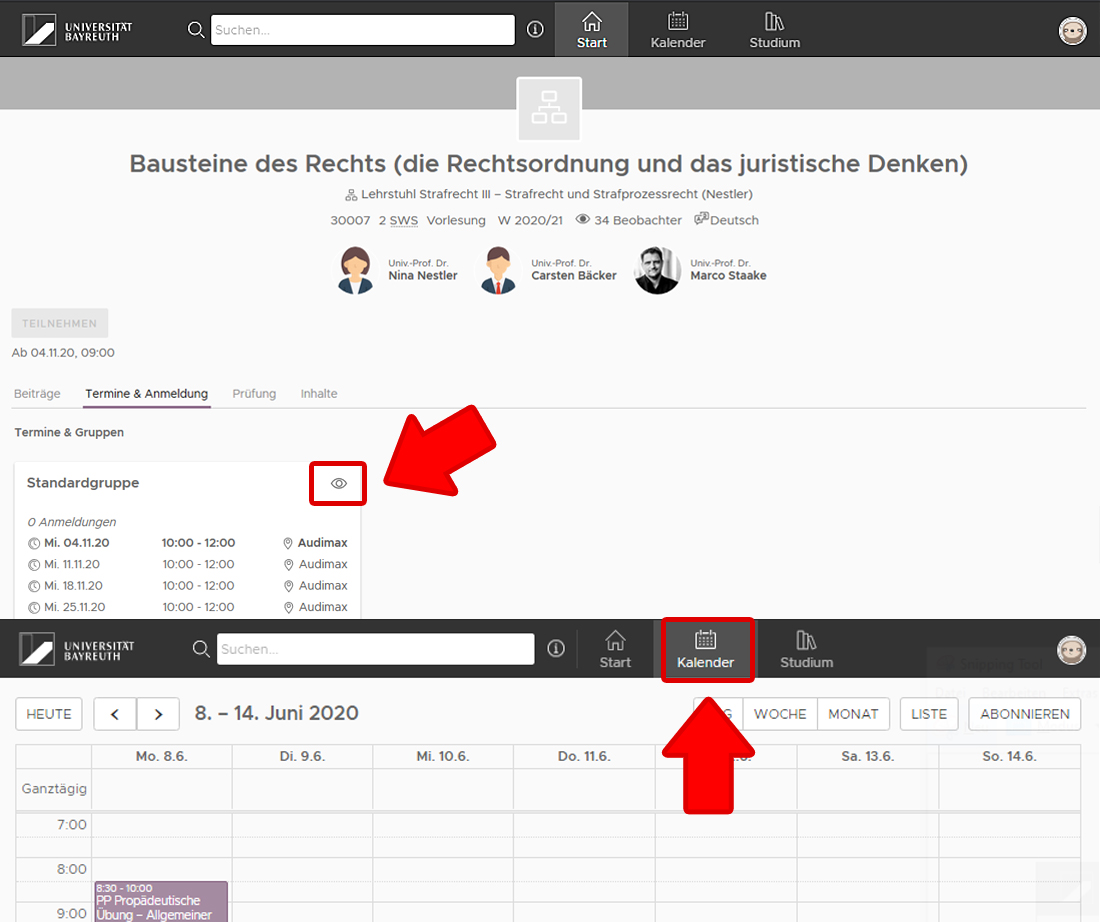
- 8) Clicking on the eye icon adds the course to your cmlife calendarHide
-
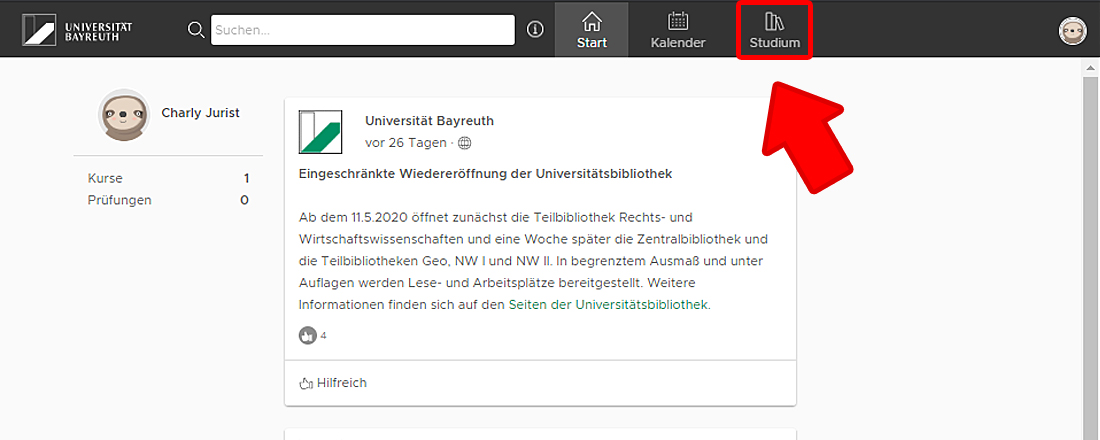
This automatically creates your timetable. You can access the Kalender (calendar) via the menu item at the very top of the black menu bar.
If several groups are listed together for a course, all of these groups will also be added to the calendar, even if you may only need to participate in one of them.
Additional Information and Useful Tips
- Registration for CoursesHide
-
You often do not need to register for lectures. This is why the "Teilnehmen" (Participate) button is greyed out. Sometimes registration is only possible at a later date. In this case, you will find the exact registration deadlines below the participation button.
For exercises, there are often several parallel groups. You generally only need to attend one of them. The allocation may either take place through registration in cmlife or via conventional lists or other procedures. The lecturer decides which procedure is used.
Information about possible registration procedures is often provided during the first lecture of the respective module. It is therefore particularly important to attend this session.
Please also note that registration is generally only possible from the beginning of the semester onwards, that is, from 1 October for the winter semester and 1 April for the summer semester. Before this date, your degree programme will still be listed under "aktive Studien" (Inactive Studies) until it switches to "aktive Studien" (Active Studies) at the beginning of the semester.
When registering for a course, make sure that you select the correct degree programme or subject-specific programme. This is particularly important for core subjects and combined subjects as well as for individual subjects within teacher training programmes, as otherwise the course will not be assigned to the relevant subject.
- Overlapping CoursesHide
-
Courses that are offered every semester can more easily be postponed to a later semester, for example seminars.
If a course is only offered in the winter semester or only in the summer semester and you also have to take an exam covering two courses, it is considerably more complicated to take this block at a later date, particularly if the module is a prerequisite for admission to other modules.
Check whether several parallel groups are offered for a course. You may be able to resolve a scheduling conflict by choosing a different group at another time.
If there are major scheduling conflicts, contact the people responsible for your degree programme, such as the programme moderator or programme coordinator. The PULS Study Support team at your faculty is also always available as a point of contact.
Timetable planning and study planning are also an essential part of the introductory event for your subject or degree programme.
- Do I Need to Create a Timetable Before Starting My Studies?Hide
-
Our recommendation is that you try to create your timetable before the lectures begin. This will help you become familiar with the Module Handbook and Examination Regulations. You will also gain an overview of possible registration deadlines and registration procedures.
Take your timetable draft with you to the introductory event. There, you can compare it with the recommendations or requirements provided by those responsible for your degree programme and ask any questions you may have.